Setup Guides
Connect your phone system to NumberGroup
Keep the hardware you already own — switch the carrier behind it. Pick your desk phone, softphone or PBX below for a step-by-step SIP trunk setup guide with real, working config. Most take under ten minutes.
Start here
SIP Trunking explained: what it is, why it matters, and how it works in 2026
A plain-English guide to SIP trunking for UK businesses — sound quality, reliability, number portability, encryption, equipment, emergency calls, and what it actually costs.
Read the guide →The easy way — let us set it up
Don't want to configure anything? Use our own Luna PBX app on your phone or laptop, or order a phone from us that arrives ready to use. No SIP settings, no hassle.

Luna PBX: the NumberGroup softphone for mobile and desktop
Make and receive calls on your NumberGroup number from your phone or laptop with the Luna PBX app — iPhone, Android, Windows and Mac. Log in by QR code, no SIP setup. HD voice, transfer, hold and call recording built in.
4 min read →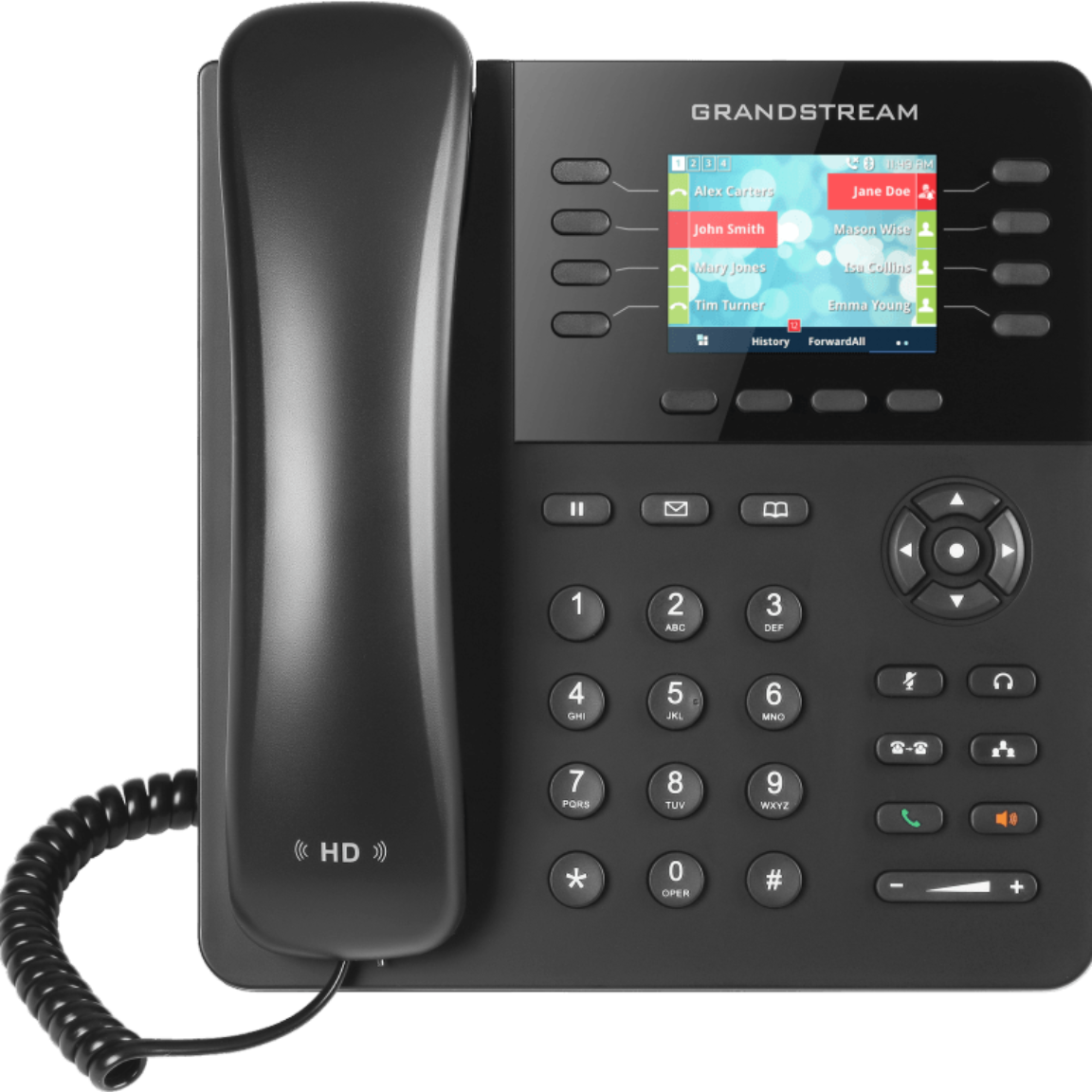
Plug-and-play desk phones: Grandstream IP phones, pre-configured by us
Order a Grandstream desk phone from NumberGroup and it arrives ready to use — pre-provisioned to your account. Plug in the power and an Ethernet cable to your broadband, and it works. No setup, no web UI, no IT person.
3 min read →IP desk phones
Register a desk phone straight to a NumberGroup SIP trunk — no PBX in the middle. Plug in Ethernet, paste your SIP credentials, done.

Connect a Yealink desk phone to a NumberGroup SIP trunk
Register a Yealink T-series IP phone (T31, T33, T46, T54) directly to a NumberGroup SIP trunk — web UI walkthrough, codec settings, NAT, dial-plan and the firmware version gotcha to know.
6 min read →
Connect a Poly (Polycom) VVX desk phone directly to a NumberGroup SIP trunk
Register a Poly VVX 150 / 250 / 350 / 450 (formerly Polycom) directly to a NumberGroup SIP trunk — web UI walkthrough, line config, codec list, dial-plan, NAT, and the UC software version that matters.
6 min read →
Connect a Grandstream desk phone directly to a NumberGroup SIP trunk
Skip the PBX — register a Grandstream GXP1625, GXP2135 or GXP2170 directly to a NumberGroup SIP trunk. Account profile settings, codecs, NAT, hotline, dial-plan, and the LCD status check that confirms registration.
7 min read →
Connect a Snom desk phone to a NumberGroup SIP trunk
Map your NumberGroup SIP trunk credentials to the right fields on a Snom D-series desk phone (D717, D735, D785, D862). Field-by-field mapping table plus a link to Snom's own web-UI guide.
5 min read →
Connect a Fanvil desk phone to a NumberGroup SIP trunk
Map your NumberGroup SIP trunk credentials to the right fields on a Fanvil X-series IP phone. Field-by-field mapping table plus a link to Fanvil's own model manual for the exact navigation.
5 min read →
Connect an Htek desk phone to a NumberGroup SIP trunk
Map your NumberGroup SIP trunk credentials onto an Htek UC-series IP phone — where the server lives on the Profile page and the credentials on the Account page. Field-by-field mapping table plus Htek's own guide.
5 min read →Softphones (desktop & mobile)
Take your business number anywhere on a laptop or phone. Free and paid apps for Windows, macOS, iOS and Android.

Connect Bria (CounterPath) softphone to a NumberGroup SIP trunk
Map your NumberGroup SIP trunk credentials onto Bria Solo, Teams or Enterprise on desktop and mobile — domain, username, password, set in the Bria Portal. Mapping table plus CounterPath's own guide.
5 min read →
Connect Zoiper softphone to a NumberGroup SIP trunk (mobile + desktop)
Add a NumberGroup SIP trunk to Zoiper 5 on iOS, Android, Windows or macOS in 90 seconds. Manual SIP account config, push notifications, codec settings, and the wake-up gotcha to know.
6 min read →
Connect Linphone softphone to a NumberGroup SIP trunk
Free, open-source softphone for desktop and mobile. Add a NumberGroup SIP trunk to Linphone in 2 minutes — proxy, transport, codecs, audio quality settings that actually work.
5 min read →
Connect MicroSIP to a NumberGroup SIP trunk (Windows)
Lightweight Windows SIP softphone. Register MicroSIP to a NumberGroup SIP trunk in 90 seconds — accounts dialog, NAT settings, codec preferences, hotkeys for power users.
5 min read →
Set up Groundwire / Acrobits Softphone with a NumberGroup SIP trunk
How to register the branded NumberGroup softphone (Acrobits Groundwire) — or the off-the-shelf Acrobits Softphone — to a SIP trunk. Push notifications, CallKit, codecs and the call-recording bolt-on.
6 min read →
Use a UK business number on iPhone that rings like a native call (CallKit explained)
iOS doesn't have a native SIP profile in the Phone app — but CallKit makes any SIP softphone (Groundwire, Linphone, Zoiper Premium) ring on the lock screen exactly like a real phone call. The honest mechanism and which apps support it.
6 min read →DECT cordless
Cordless handsets for warehouses, care homes, retail floors and anywhere staff move around. Set the SIP account on the base, then assign it to a handset.
Connect a Grandstream DP-series DECT phone to a NumberGroup SIP trunk
Map your NumberGroup SIP trunk credentials onto a Grandstream DP750/DP752 DECT base — Profile holds the server, SIP Account holds the credentials, and Handset Line assigns it to a handset. Mapping table plus Grandstream's own guide.
5 min read →Connect a Yealink W-series DECT phone to a NumberGroup SIP trunk
Map your NumberGroup SIP trunk credentials onto a Yealink W-series DECT base (W56/W60/W70 single-cell, W80/W90 multi-cell) and assign the account to a handset. Mapping table plus Yealink's own guide.
5 min read →Connect a Snom M-series DECT phone to a NumberGroup SIP trunk
Map your NumberGroup SIP trunk credentials onto a Snom M300/M700/M900 DECT base — create a Server, add an Extension that uses it, then register a handset. Mapping table plus Snom's own admin guide.
5 min read →
Connect a Gigaset N-series DECT phone to a NumberGroup SIP trunk
Map your NumberGroup SIP trunk credentials onto a Gigaset N530/N670/N870 IP PRO DECT base — create a provider profile, add a SIP account, then assign it to a handset. Mapping table plus Gigaset's own Admin Master guide.
5 min read →PBX & platforms
Already running a phone system? Add a NumberGroup SIP trunk to your existing PBX with real, working config — not vendor brochure-speak.

Connect 3CX to a NumberGroup SIP trunk: step-by-step setup
Add a NumberGroup SIP trunk to 3CX Phone System using the built-in generic provider template. Real config: sip.numbergroup.com registrar, T-AAAAAA-NNN auth ID, inbound and outbound rules, common pitfalls.
8 min read →
Connect Cisco Unified Communications Manager to a NumberGroup SIP trunk
Add a NumberGroup SIP trunk to Cisco CUCM 12.5/14/15 — SIP profile, trunk security profile, SIP trunk config, route pattern, inbound translation pattern. Real config with sip.numbergroup.com and T-AAAAAA-NNN auth.
9 min read →
Connect Avaya IP Office to a NumberGroup SIP trunk
Add a NumberGroup SIP trunk to Avaya IP Office (R11/R12) via IP Office Manager — SIP Line configuration, transport, URI / Caller ID, ARS short codes, incoming call route. Real working values.
8 min read →
Connect a Mitel MiVoice (3300 MXE / MiVoice Business) to a NumberGroup SIP trunk
Add a NumberGroup SIP trunk to Mitel MiVoice Business — SIP peer profile, ARS routing, registration credentials, CESID, codec settings, and the Mitel-specific gotchas (5060 vs 5070, MiAUDA, codec re-negotiation).
8 min read →
Connect a Yeastar P-Series PBX to a NumberGroup SIP trunk
Add a NumberGroup SIP trunk to a Yeastar P-Series PBX (P550, P560, P570) using a General Register Trunk. Real config: sip.numbergroup.com host, T-AAAAAA-NNN username and authentication name, DDIs, routes and the common registration pitfalls.
6 min read →Connect a Yeastar S-Series PBX to a NumberGroup SIP trunk
Add a NumberGroup SIP trunk to a Yeastar S-Series PBX (S20, S50, S100, S300) using a General Register Trunk. Real config: Settings > PBX > Trunks, sip.numbergroup.com Hostname/IP and Domain, T-AAAAAA-NNN Username, Authentication Name and From User, DIDs, routes and the registration pitfalls.
6 min read →
Connect a Panasonic KX-NS PBX to a NumberGroup SIP trunk
Add a NumberGroup SIP trunk to a Panasonic KX-NS700, KX-NS1000 or KX-NSX PBX via the V-SIPGW16 virtual card in the Maintenance Console. Real config: sip.numbergroup.com SIP Server, T-AAAAAA-NNN User name and Authentication ID, the activation-key prerequisite, DDI routing, CLI and registration pitfalls.
7 min read →Connect a Grandstream UCM to a NumberGroup SIP trunk
Add a NumberGroup SIP trunk to a Grandstream UCM6200/6300 IP PBX with a Register SIP Trunk. Real config: sip.numbergroup.com host name, T-AAAAAA-NNN username and authenticate ID, caller ID, inbound and outbound routes, and the registration status check.
6 min read →
Connect FreeSWITCH to a NumberGroup SIP trunk: gateway config that works
Working FreeSWITCH gateway XML for a NumberGroup SIP trunk — sip.numbergroup.com registrar, T-AAAAAA-NNN auth, inbound dialplan that routes by DDI in R-URI, NAT and codec settings.
8 min read →
How to connect Asterisk to a SIP trunk: working sip.conf and extensions.conf
Step-by-step guide to receiving SIP calls on an Asterisk PBX from NumberGroup. Working sip.conf, extensions.conf, debugging commands, NAT/firewall gotchas, and what to do when the trunk won't register.
9 min read →Analogue adapters (ATA)
Keep an existing analogue phone, fax machine, cordless base or alarm dialler and put it on a NumberGroup SIP trunk — the way to carry an old analogue line across the PSTN / ISDN switch-off without replacing the kit.
Connect a Grandstream HandyTone ATA to a NumberGroup SIP trunk
Put an existing analogue phone, fax machine or cordless base on a NumberGroup SIP trunk with a Grandstream HandyTone ATA (HT801, HT802, HT812). Real FXS-port config: sip.numbergroup.com Primary SIP Server, T-AAAAAA-NNN SIP User ID and Authenticate ID, codecs, T.38 fax and the registration pitfalls.
5 min read →Connect a Cisco ATA to a NumberGroup SIP trunk
Put an existing analogue phone, fax machine or cordless base on a NumberGroup SIP trunk with a Cisco ATA 191 or ATA 192 (multiplatform firmware). Real Voice > Line config: sip.numbergroup.com Proxy, T-AAAAAA-NNN User ID and Auth ID, Use Auth ID, codecs, T.38 fax and the registration pitfalls.
5 min read →Don't see your device?
If it speaks SIP — and almost every modern IP phone and PBX does — it works with NumberGroup. Tell us what you're running and we'll send the exact settings, or our team will get on a call and set it up with you. Analogue phones need an ATA gateway, which we can supply.
Keep your phones. Lose the markup.
NumberGroup Membership gives you SIP trunks with no per-channel fee, every feature included, and BT Wholesale call rates passed straight through. £149/month flat, no contract.