Every call, written up and waiting in your inbox — meet transcribed
transcribed turns calls on your enabled NumberGroup numbers into readable transcripts with AI summaries, caller mood, escalation flags, Time to answer, optional customer-specific QA scorecards and a one-tap read-along player — emailed shortly after the call ends. No app for your team to install, and call analysis is designed to run on NumberGroup infrastructure in the UK.
Calls into your business are full of things worth keeping — the name, the order number, the promise you made, the reason they were annoyed. And nearly all of it evaporates the moment you hang up. transcribedis a NumberGroup product that turns calls on your enabled NumberGroup numbers into readable transcripts with AI summaries, answer-time signals, customer-specific QA scorecards where you want them, and a one-tap player — emailed to you shortly after the call ends — delivery time varies with call length and system load; most transcripts arrive within minutes, though longer calls or busy periods may take longer. There is no app for your team to install. If you can read an email, you can use it.
This is what lands in your inbox
Shortly after each enabled call finishes, you get an email — delivery time varies with call length and system load; most transcripts arrive within minutes, though longer calls or busy periods may take longer. Not a raw wall of text — a briefing. An escalation banner when the AI flags that a call may need attention, the caller’s mood, Time to answer, the line’s recent answer average, an AI summary of what happened and what’s next, whether it was resolved, and whether this person has called before — then the transcript underneath. Where you use a call-handling scorecard, the checks can be tailored to your business, and the score can lead the subject line so weak calls stand out before anyone opens the email.
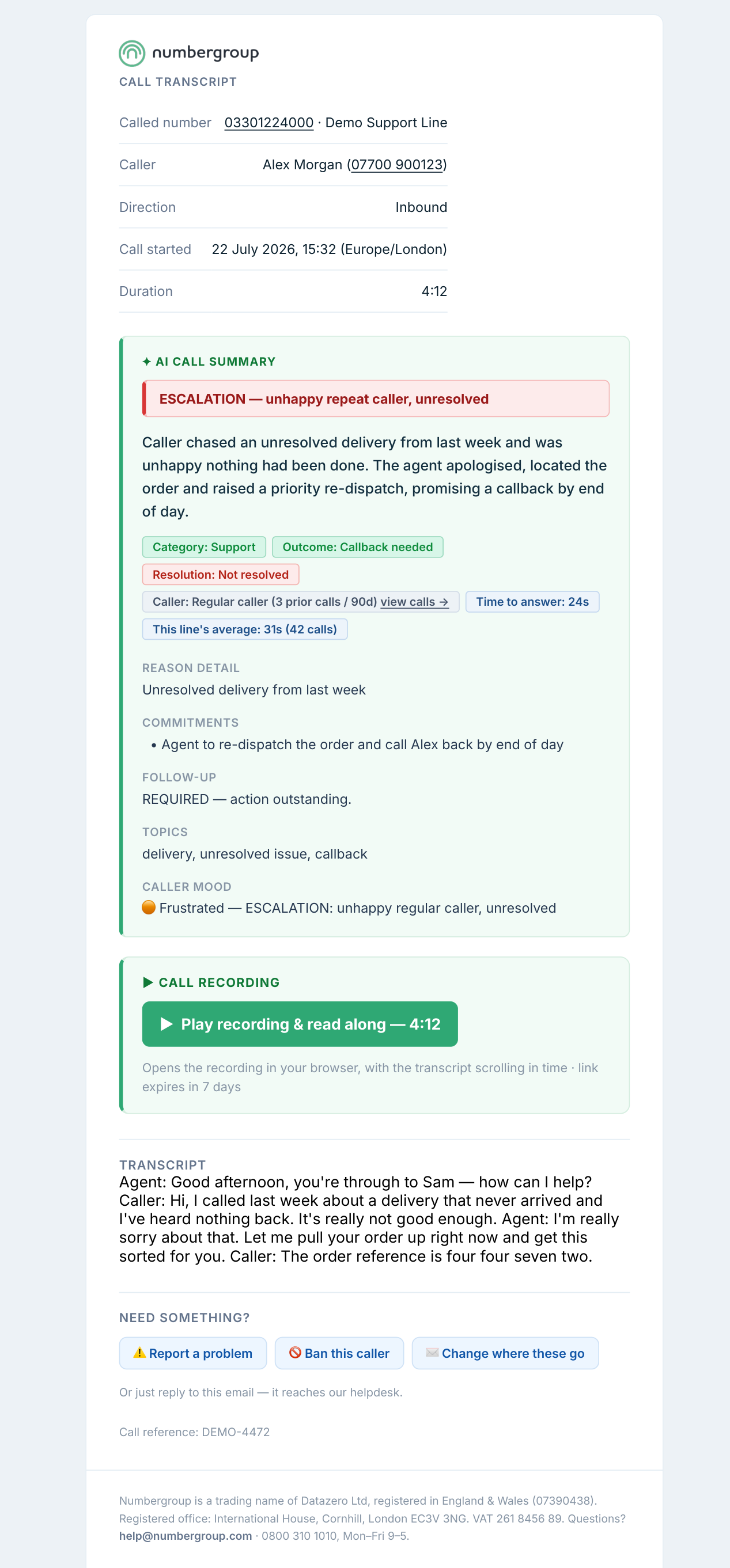
You can see which calls may need attention before reading the full transcript, with the key details already on the screen.
A player built for how people actually review calls
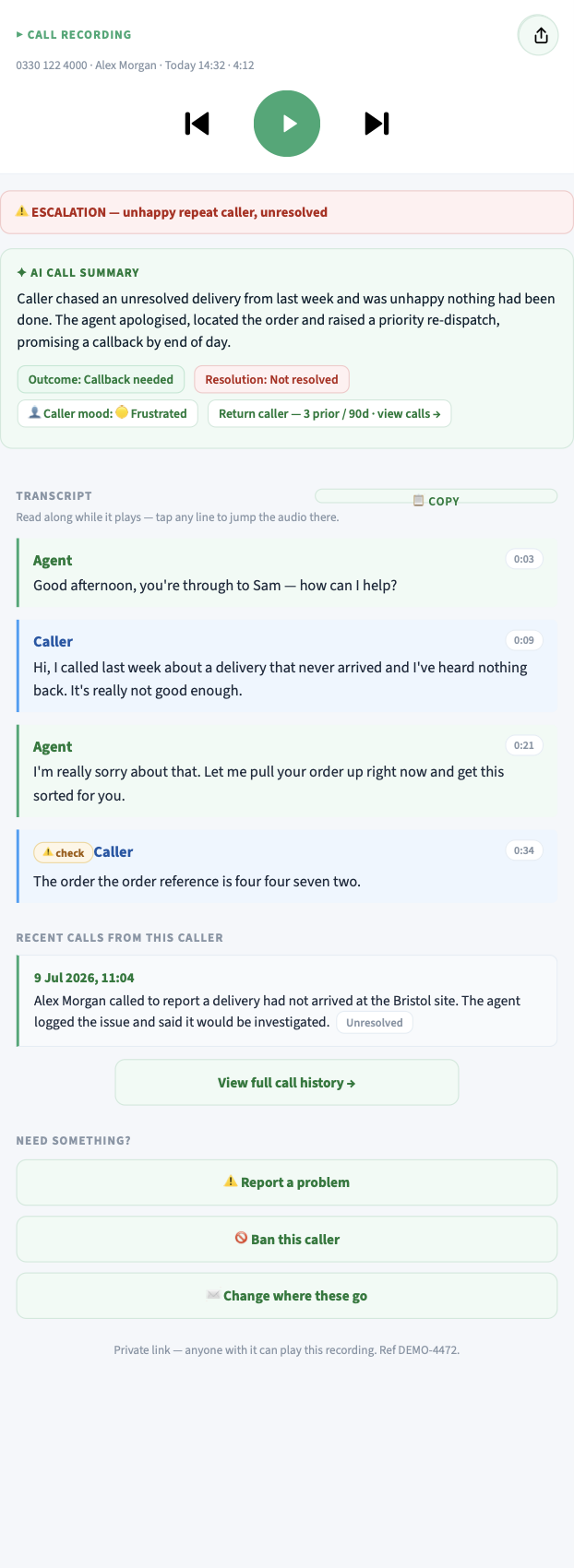
Tap the recording card and a secure player opens in your browser — no app, no login friction. It’s designed to get you to the moment that matters fast:
- Read-along transcript— the text auto-scrolls to the line being spoken as the audio plays.
- Tap any line to jump the audio straight to that moment.
- Skips the hold music— playback starts at the first real human speech, past the IVR and the queue.
- Rewind & forward 15 seconds to catch a detail you missed, and share a call to a colleague in one tap.
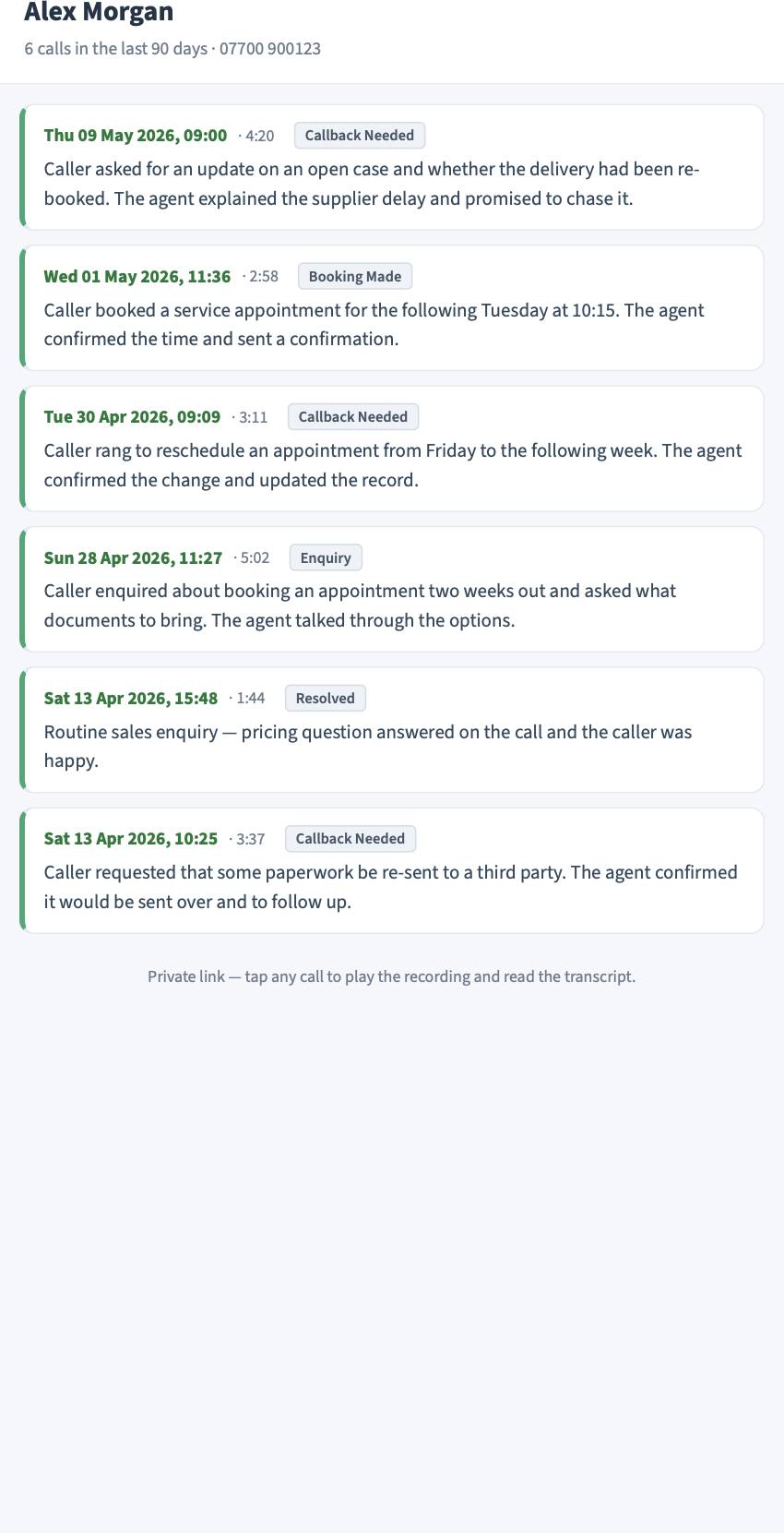
The whole relationship, on one screen
A caller’s past calls are gathered together for you by their phone number. Open a caller and you see the calls they’ve made, each with its date, length, outcome and a one-line summary. Someone who’s rung four times this month about the same unresolved issue stands out, so you can spot the pattern and decide what to do next.
It doesn’t just transcribe — it analyses
Each enabled call is analysed by AI shortly after it ends. Calls flagged as needing attention are surfaced to help you prioritise, reducing the need to review every routine call manually. These signals appear right inside the email and the player:
- Escalation alerts— when the AI detects signals that a call may have ended unhappy or unresolved, especially from a repeat caller, a clear ESCALATION banner is added to help it reach a person quickly. As with any automated analysis, some calls may be missed or mis-flagged.
- Caller mood— each call is analysed for tone indicators and labelled (angry, frustrated, upset, confused or calm), giving you a signal of how the caller may have felt. Tone detection is not always accurate and should be verified where it matters.
- Outcome & resolution— tagged with what happened (enquiry, sale, booking, complaint, callback needed) and whether it was resolved, turning your call log into something you can measure.
- Customer-specific QA scorecards— check calls against your own standards, such as greeting, the right questions asked, issue resolved and tone. The checklist is not one-size-fits-all: it can be different for a garage, a care provider, a charge-point operator or a sales desk. The result can be a clear percentage score, so calls that may need review are flagged for your attention.
- Time to answer— see how long the caller waited before a real person spoke. It is useful for service management and, for helplines with regulatory requirements around answer times, the data can support your internal service tracking — this is product information, not compliance advice, and you remain responsible for verifying any figures before presenting them to a regulator.
- Accuracy flags— where the AI is less sure of a word, it quietly flags the line for a quick check, helping you avoid relying on a doubtful word.
You may get hundreds of calls, but only a handful need you today. transcribed analyses enabled calls and flags those that may be unhappy, unresolved or important, helping your team prioritise. Flagging is not always accurate, so verify where it matters.
What businesses actually use it for
- Key details stay on record— names, numbers, addresses and promises are captured in writing, with accuracy flags where the AI is less certain.
- Train and improve— review how calls are handled, coach your team, and see what customers are really calling about.
- Support dispute resolution— a written record and the recording of what was discussed, available when you need to review what happened.
- Catch possible issues early— escalation and mood flags can highlight a caller who may need attention while you can still do something about it.
- Save hours— read a 10-minute call in 30 seconds, and only listen back to the part that matters.
- Feed your own systems— push summaries and call data into your CRM via an encrypted webhook, score your transcribed calls against your own checklist automatically, or report on answer times without someone manually listening back.
It earns its place anywhere the phone is how customers reach you — support desks, sales teams, trades and field firms, property, clinics, helplines. Any line where “what was actually said on that call?” is a question worth answering.
From ringing phone to inbox — automatically
- 1. A call comes in. Someone rings one of your NumberGroup numbers and has a conversation, exactly as normal. Nothing changes for you or your caller.
- 2. We transcribe and analyse it. The moment the call ends, transcribed converts the recording to text, separates who said what, writes a short AI summary and applies any scorecard configured for that customer or line.
- 3. It lands in your inbox.Shortly after: the summary, the key details, a play-back card and the full transcript — ready on your phone or desktop.
- 4. You read, listen or share. Open the player to hear the call with the transcript following along, jump to any line, or share it with a colleague.
Privacy and responsibility
Call content is sensitive, and we treat it that way. Transcription and analysis are done only by AI models running on NumberGroup’s own infrastructure. Recordings are stored encrypted and served over time-limited, access-controlled links. It’s designed with UK data protection considerations in mind — though as with any call recording, you remain the data controller and responsible for using it lawfully. The Privacy Policy has the full data-handling detail.
Take the full overview with you
Here’s the updated product brochure — including QA scorecards and Time to answer — laid out to read or forward to whoever else needs to see it.
Download the transcribed brochure (PDF) ↓
How to switch it on
transcribed works on the calls you already take. Datazero Ltd, trading as NumberGroup, is registered with Ofcom as a UK communications provider, so we can provide the numbers or work with the ones you have. To enable it on your account, email help@numbergroup.comor call 0800 310 1010, and we’ll switch it on and help you point it at the right inbox.
Stop losing what was said on a call
Enabled calls transcribed, summarised and playable back — delivered to your inbox shortly after they end, with the important ones flagged. Talk to a UK team, not a call centre.